> ## Documentation Index
> Fetch the complete documentation index at: https://docs.condense.io/llms.txt
> Use this file to discover all available pages before exploring further.
# Applications
## **Overview**
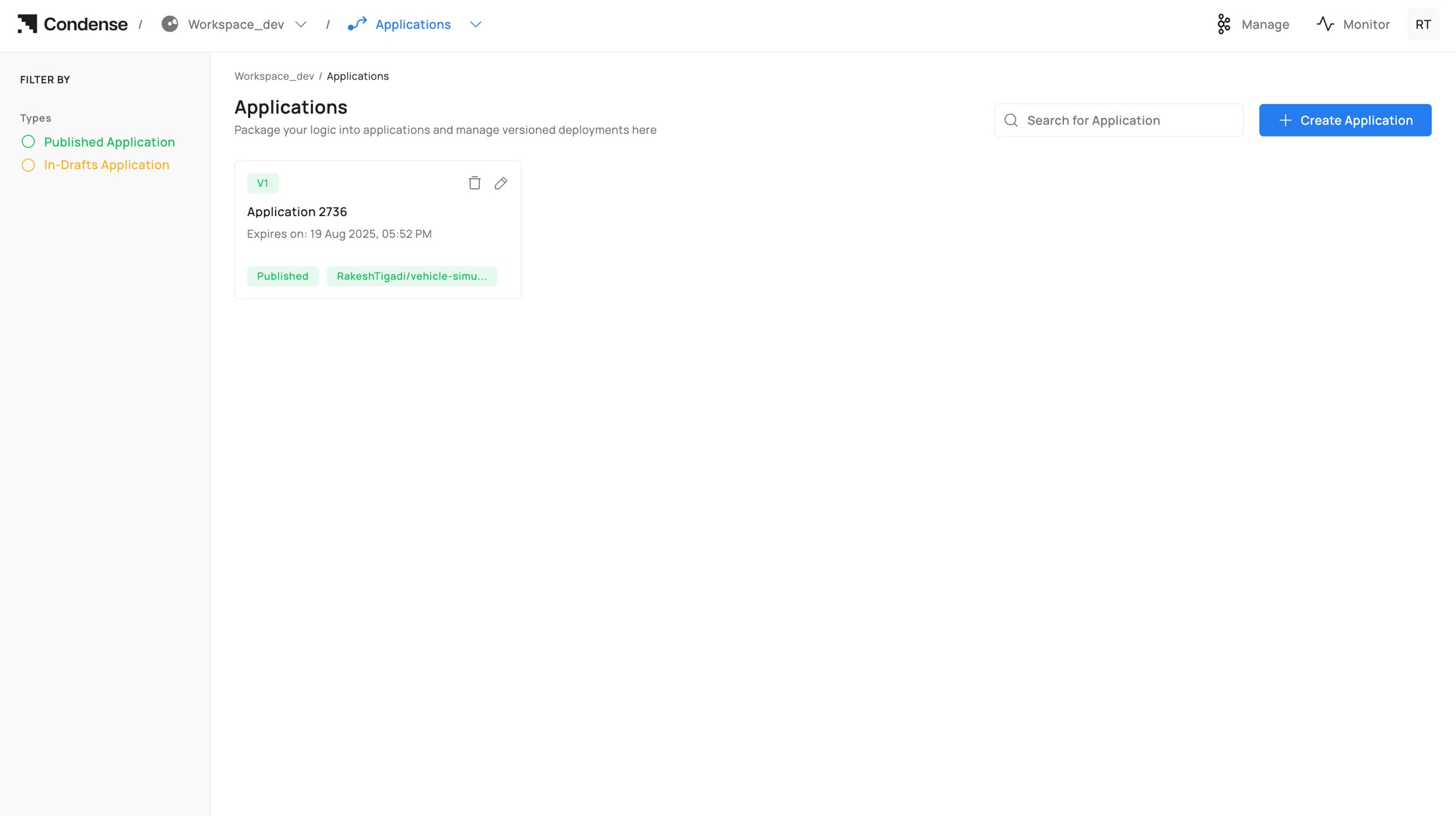
An Application in Condense is a custom, code‑based unit developed in the built‑in IDE and version‑controlled through Git. Once built and published, an application becomes deployable as a Custom Transform or a Custom Connector (Input or Output) within a workspace pipeline.
Applications help:
* Implement domain‑specific processing or integrations when prebuilt options are insufficient.
* Keep logic close to the data path and governed by workspace roles.
* Maintain traceability through Git commits, image tags, and published versions.
* Standardize development‑to‑deployment through a single, auditable workflow.
## **What You Can Do in Applications**
### **Create, Develop, and Test**
* Create an Application from a connected Git repository or start from a template.
* Edit code in the IDE (file explorer + code editor) and commit to Git.
* Configure ENVs (environment variables) for build/runtime.
* Optionally expose HTTP(s)/TCP servers for service testing.
* Use Publish/Subscribe testers to validate I/O against workspace topics.
### **Build and Publish**
* Build the Application into a container image (image name + tag) with live build logs.
* Publish the Application as:
* Custom Transform (processing component in pipeline), or
* Custom Connector: Input or Output (integration component listed with connectors).
### **Operate and Maintain**
* View versions (draft and published) with immutable release history.
* Roll back by selecting an earlier published version at deployment time.
* Delete drafts or published Applications (role‑gated; irreversible in Condense).
## **Applications Lifecycle**
Every Application follows a clear lifecycle, from creation and development to build, publish, deployment, iteration, and eventual deletion. This section outlines each stage and who can perform it.
### **1) Creating an Application**
**Who can create**: Workspace Admins, Maintainers, Developers
Steps to follow while creating an application:
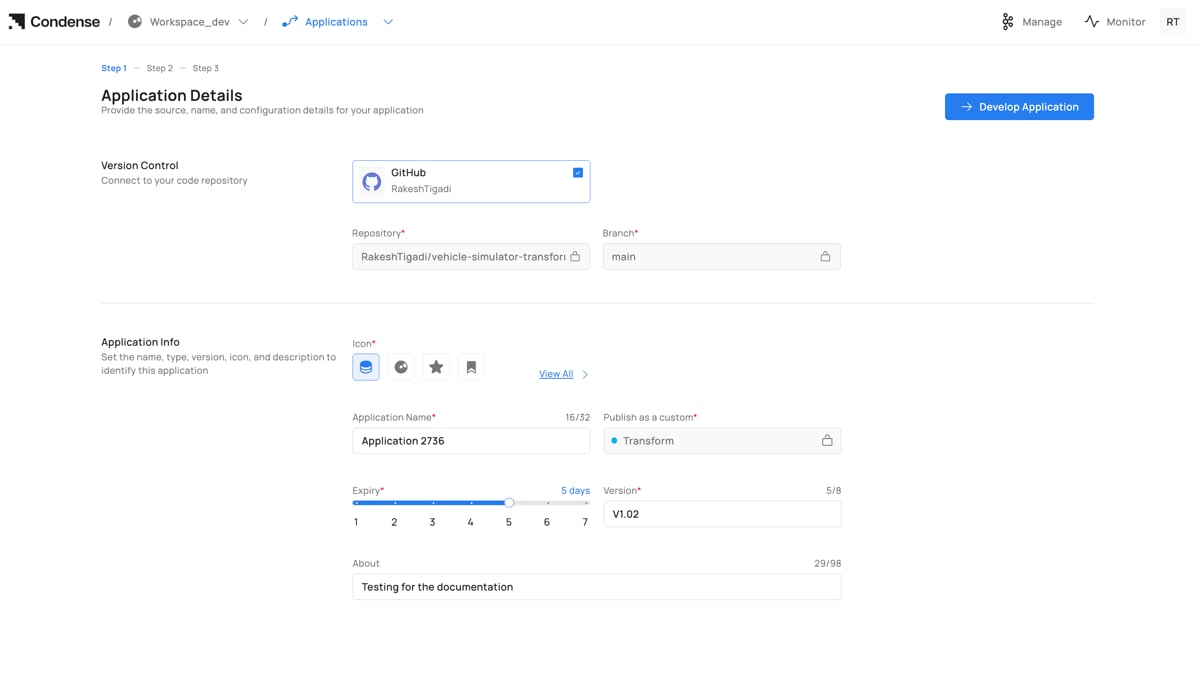
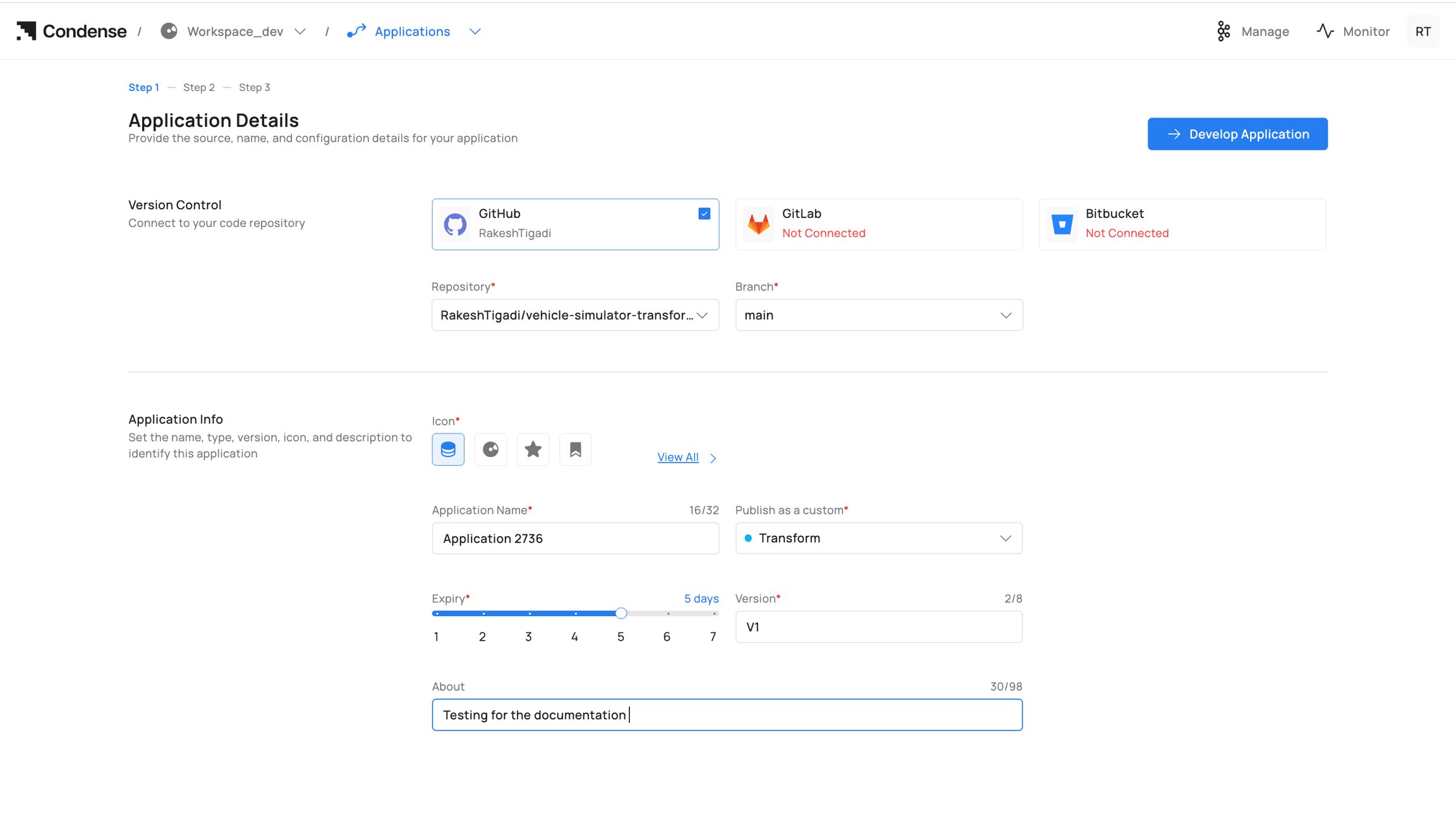
1. Go to Applications → Create Application.
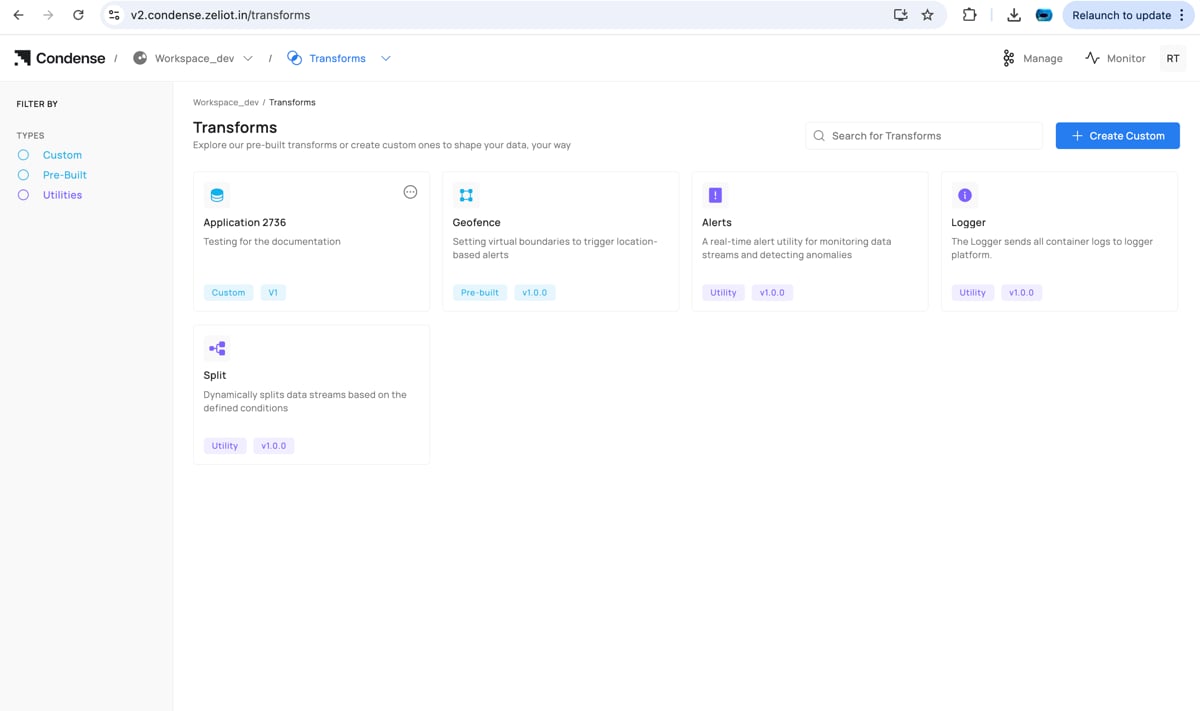 2. Version Control: Connect a provider (GitHub/GitLab/Bitbucket), then select Repository and Branch.
3. Application Info:
4. Icon (optional)
5. Application Name (unique within workspace)
6. Publish as a custom: Transform, Input Connector, or Output Connector
2. Version Control: Connect a provider (GitHub/GitLab/Bitbucket), then select Repository and Branch.
3. Application Info:
4. Icon (optional)
5. Application Name (unique within workspace)
6. Publish as a custom: Transform, Input Connector, or Output Connector
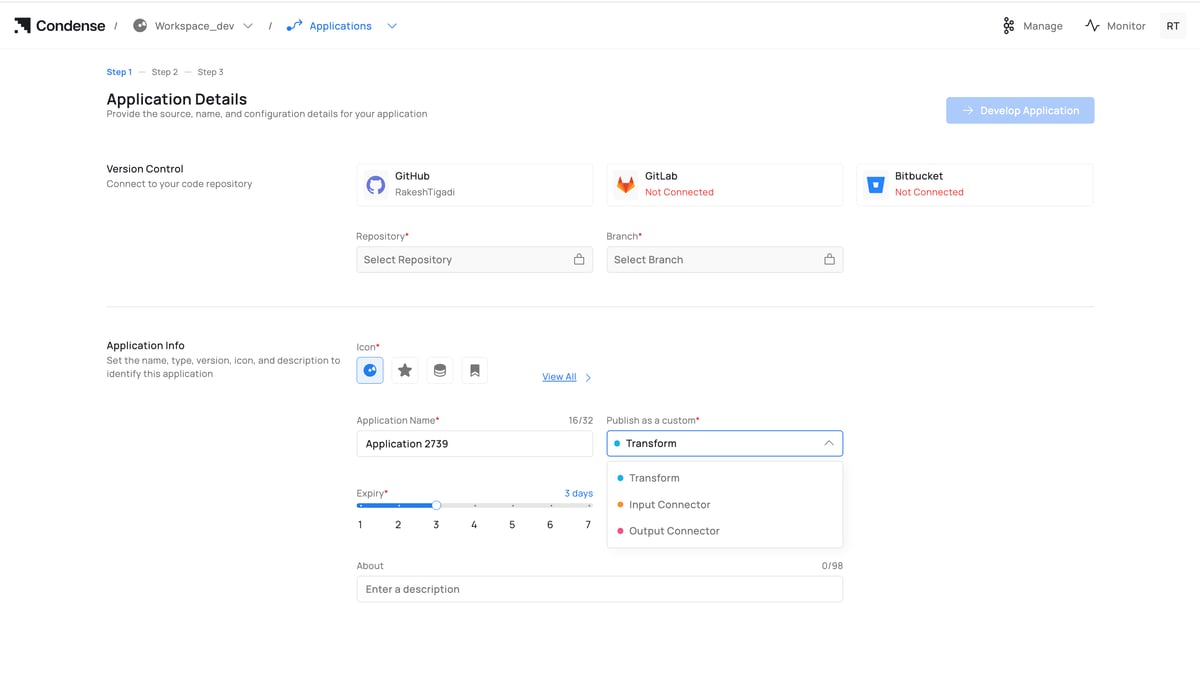 7. Expiry (draft retention period)
8. Version (e.g., v1, v1.1.0)
9. About (optional description)
10. Click Develop Application to open the IDE.
For field‑by‑field info: see Configuration Parameters → A. Creation (Step 1).
### **2) Develop in the IDE**
**Who can edit (drafts)**: Admins, Maintainers, Developers
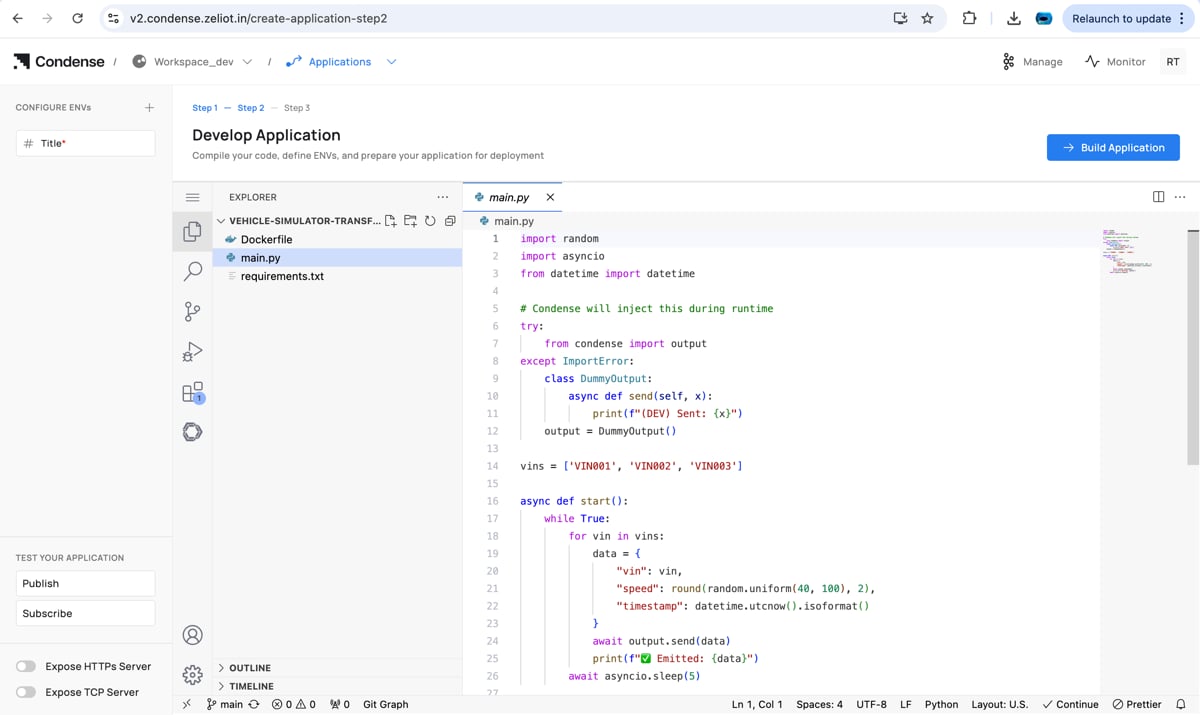
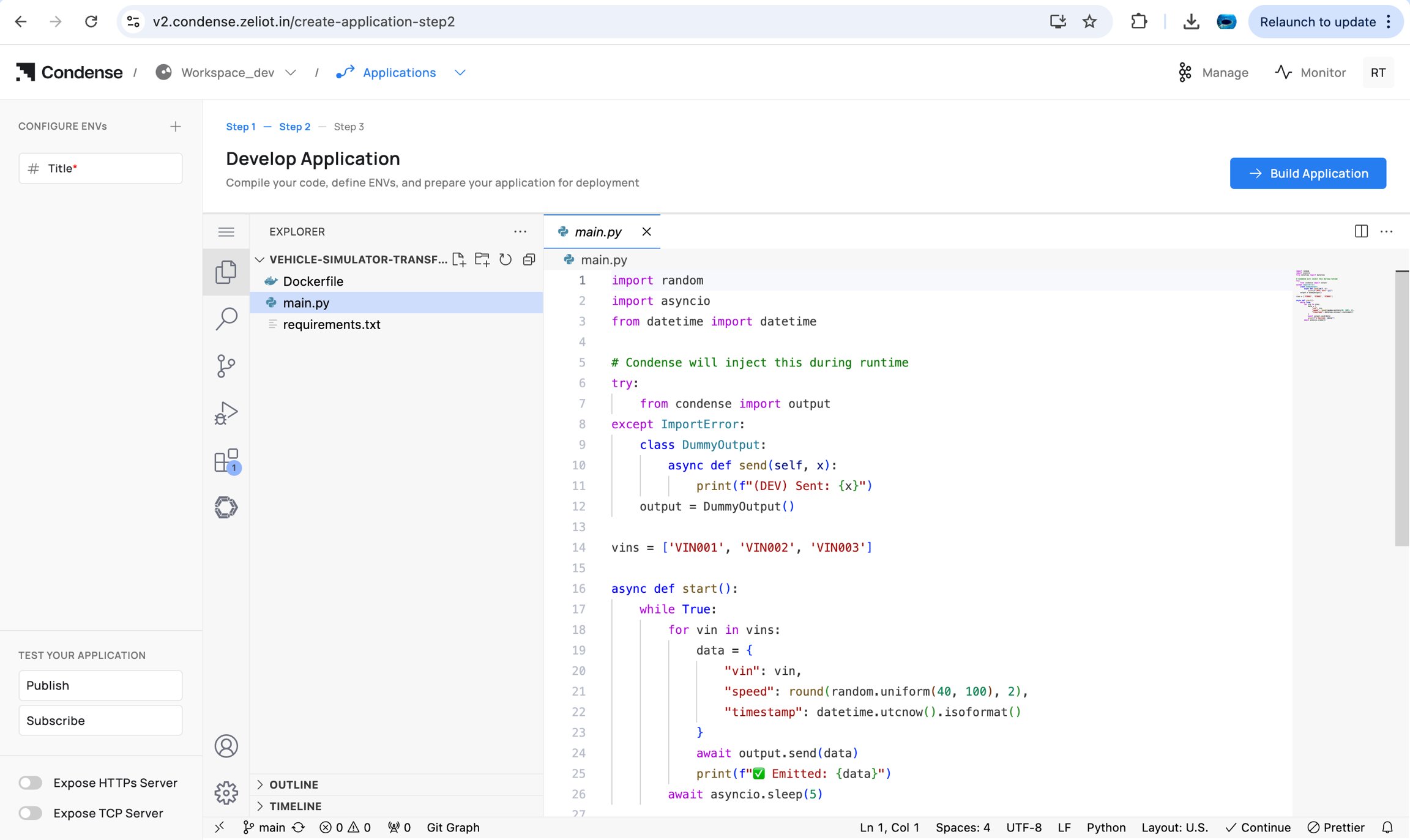
* Navigate/edit code via File Explorer and Code Editor.
* Configure ENVs (build/runtime).
* (Optional) Enable Expose HTTP(s) Server / Expose TCP Server for local testing.
* Validate topic flow with Publish and Subscribe testers.
Commit and push to the connected repository.
7. Expiry (draft retention period)
8. Version (e.g., v1, v1.1.0)
9. About (optional description)
10. Click Develop Application to open the IDE.
For field‑by‑field info: see Configuration Parameters → A. Creation (Step 1).
### **2) Develop in the IDE**
**Who can edit (drafts)**: Admins, Maintainers, Developers
* Navigate/edit code via File Explorer and Code Editor.
* Configure ENVs (build/runtime).
* (Optional) Enable Expose HTTP(s) Server / Expose TCP Server for local testing.
* Validate topic flow with Publish and Subscribe testers.
Commit and push to the connected repository.
 Capabilities and limits: see Editing an Application and IDE Structure.
### **3) Build the Application**
**Who can build:** Admins, Maintainers, Developers
Steps to build an application:
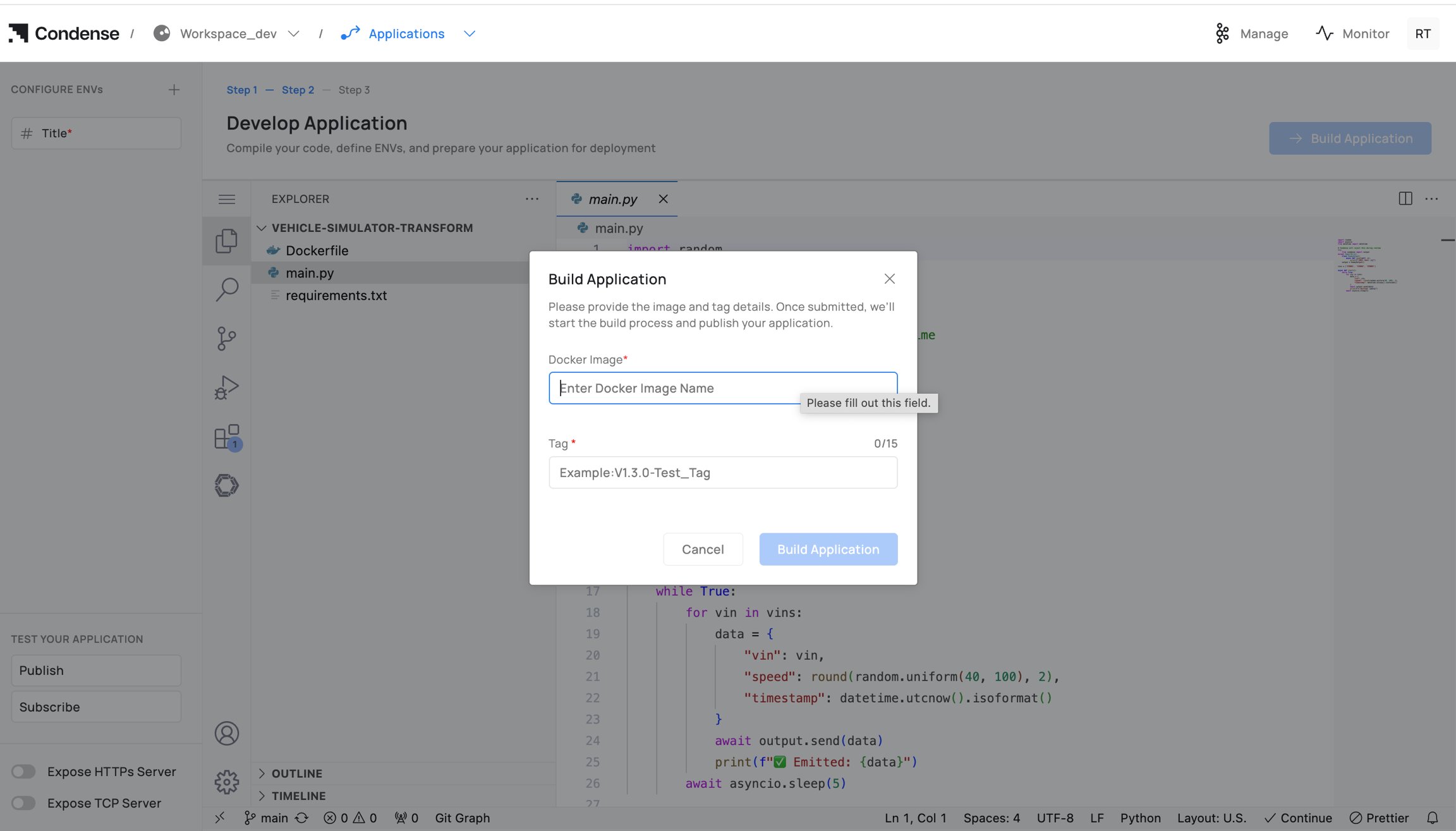
1. Click Build Application.
2. Enter Docker Image Name (registry path) and Tag.
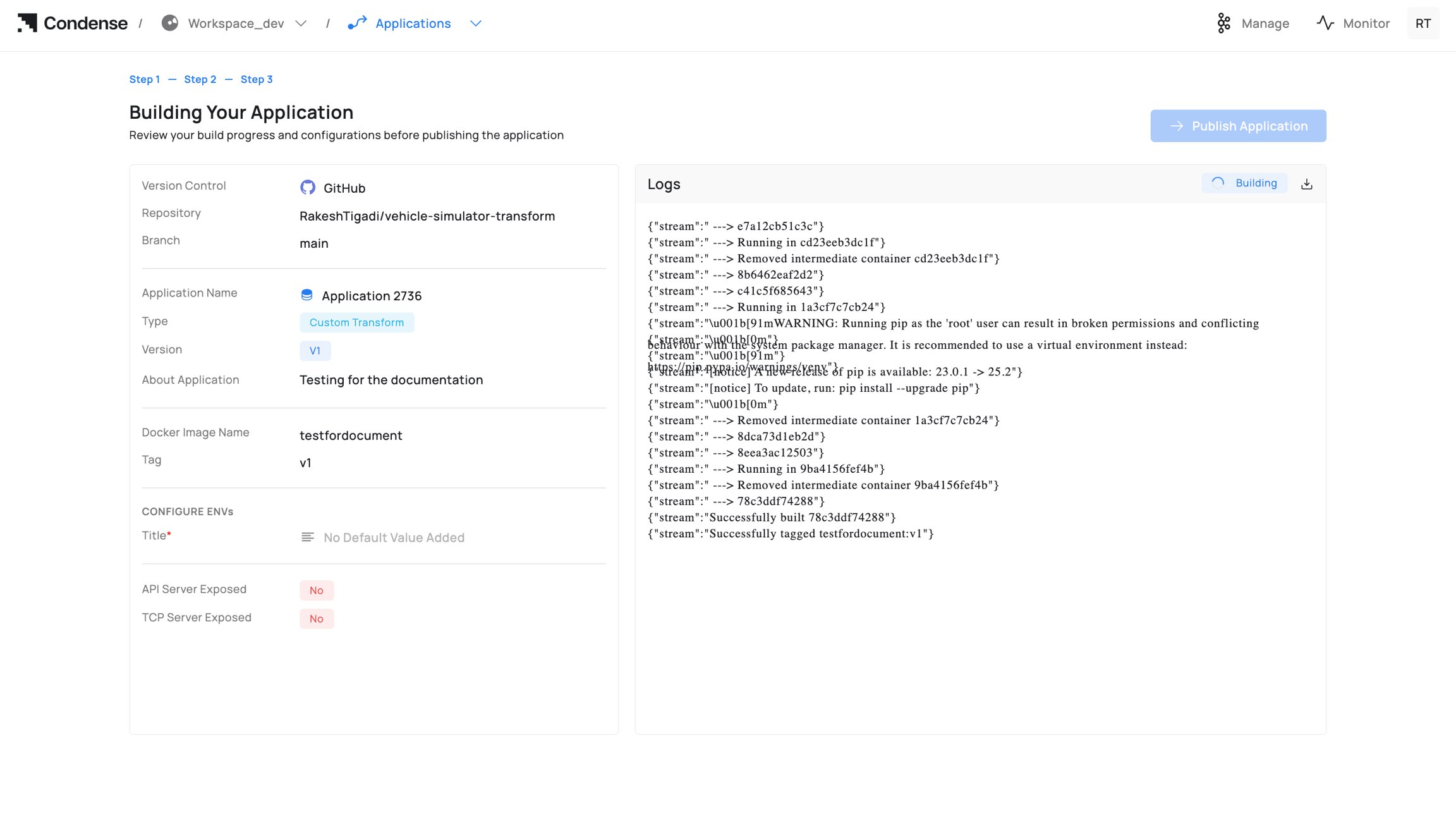
3. Start building and monitor Build Logs; fix errors and rebuild if needed.
Capabilities and limits: see Editing an Application and IDE Structure.
### **3) Build the Application**
**Who can build:** Admins, Maintainers, Developers
Steps to build an application:
1. Click Build Application.
2. Enter Docker Image Name (registry path) and Tag.
3. Start building and monitor Build Logs; fix errors and rebuild if needed. 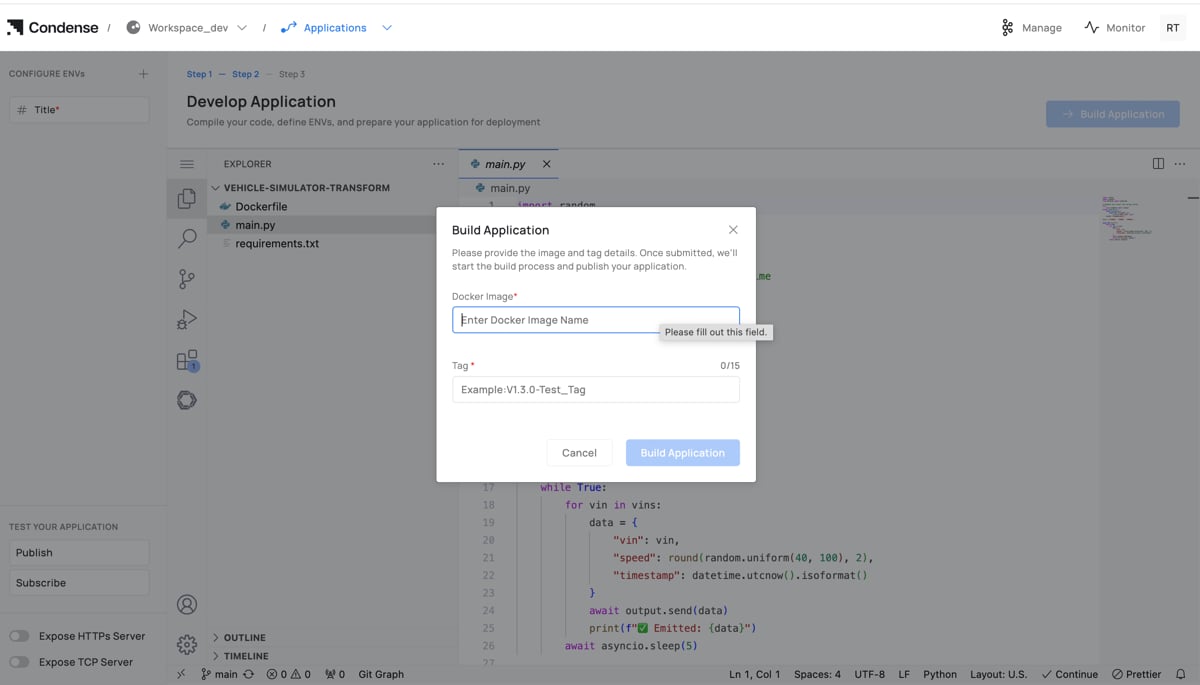
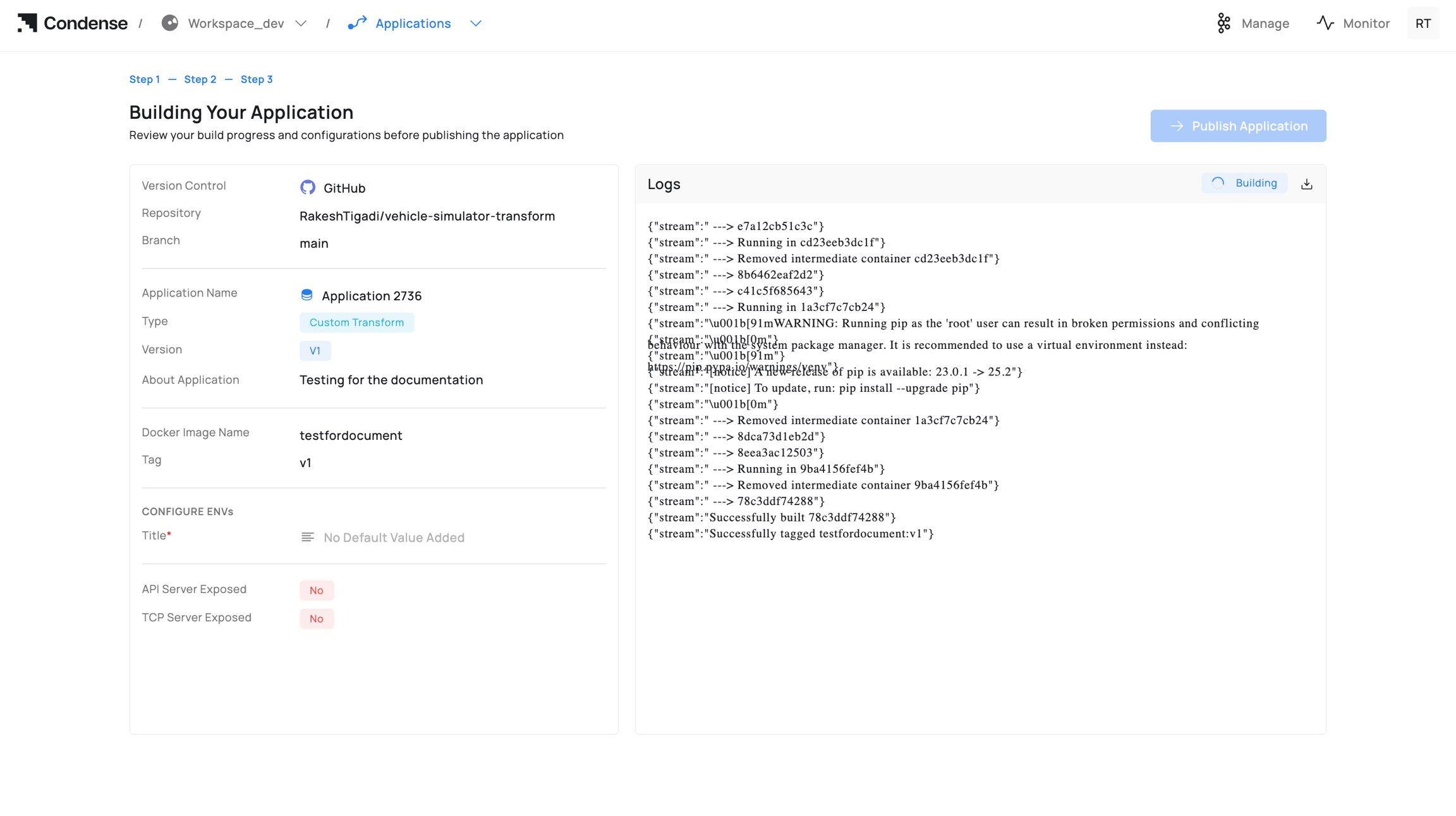 Guidance on naming/registries: Read [Building an Application.](https://docs.zeliot.in/condense/condense-app-getting-started/applications#building-an-application)
### **4) Publish the Application**
Who can publish: Admins, Maintainers
Publish targets:
* Custom Transform → appears in Transforms → Custom.
* Custom Connector (Input/Output) → appears in Connectors → Custom under the respective role.
Steps to publish the application:
1. Click Publish Application.
2. Confirm Publish as a custom type (Transform / Input Connector / Output Connector).
3. Confirm Version and optional release notes.
4. Click Publish.
Guidance on naming/registries: Read [Building an Application.](https://docs.zeliot.in/condense/condense-app-getting-started/applications#building-an-application)
### **4) Publish the Application**
Who can publish: Admins, Maintainers
Publish targets:
* Custom Transform → appears in Transforms → Custom.
* Custom Connector (Input/Output) → appears in Connectors → Custom under the respective role.
Steps to publish the application:
1. Click Publish Application.
2. Confirm Publish as a custom type (Transform / Input Connector / Output Connector).
3. Confirm Version and optional release notes.
4. Click Publish.
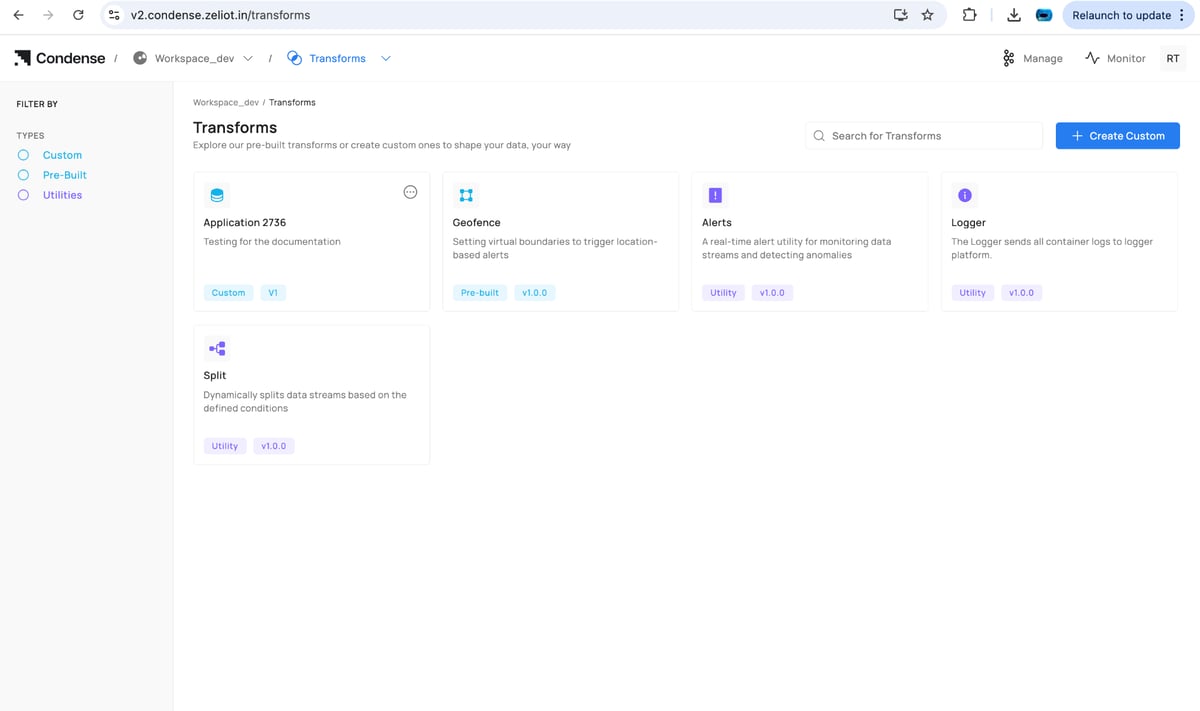 Versioning is immutable: see [Publishing an Application.](https://docs.zeliot.in/condense/condense-app-getting-started/applications#publishing-an-application)
### **5) Deploy the Published Artefact (reference)**
Deployment happens outside Applications:
* **Transforms**: pipeline editor → Add Transform → Custom → choose app/version → configure ENVs/parameters → Deploy.
* **Connectors**: Connectors → Custom → choose app → select role (Input/Output) → configure ENVs/parameters → Deploy.
Deployment behavior is covered in the Transforms and Connectors docs.
### **6) Update / Roll Back a Version**
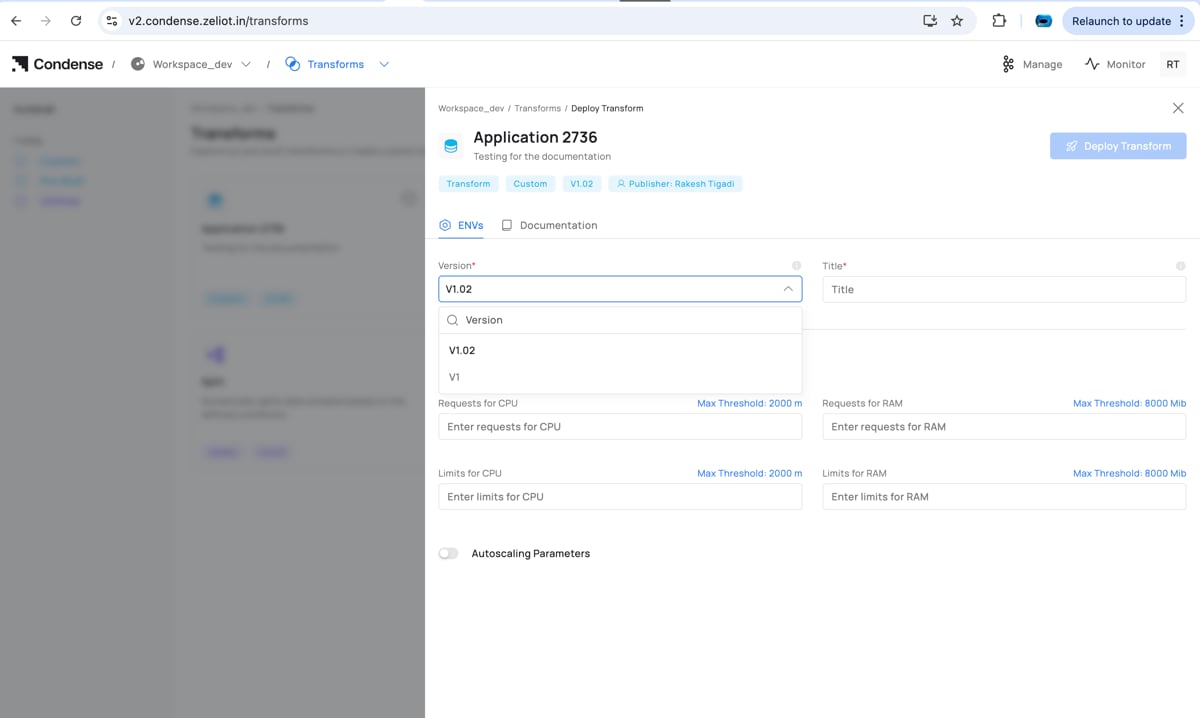
To change logic, update code in Applications, rebuild, and publish a new version. In the deployed transform/connector, switch the Version to the new release (or choose an older one to roll back).
Editing deployed parameters happens in the pipeline/connector UI. Editing logic requires a new publish from Applications.
#### **Edit application**
Versioning is immutable: see [Publishing an Application.](https://docs.zeliot.in/condense/condense-app-getting-started/applications#publishing-an-application)
### **5) Deploy the Published Artefact (reference)**
Deployment happens outside Applications:
* **Transforms**: pipeline editor → Add Transform → Custom → choose app/version → configure ENVs/parameters → Deploy.
* **Connectors**: Connectors → Custom → choose app → select role (Input/Output) → configure ENVs/parameters → Deploy.
Deployment behavior is covered in the Transforms and Connectors docs.
### **6) Update / Roll Back a Version**
To change logic, update code in Applications, rebuild, and publish a new version. In the deployed transform/connector, switch the Version to the new release (or choose an older one to roll back).
Editing deployed parameters happens in the pipeline/connector UI. Editing logic requires a new publish from Applications.
#### **Edit application**
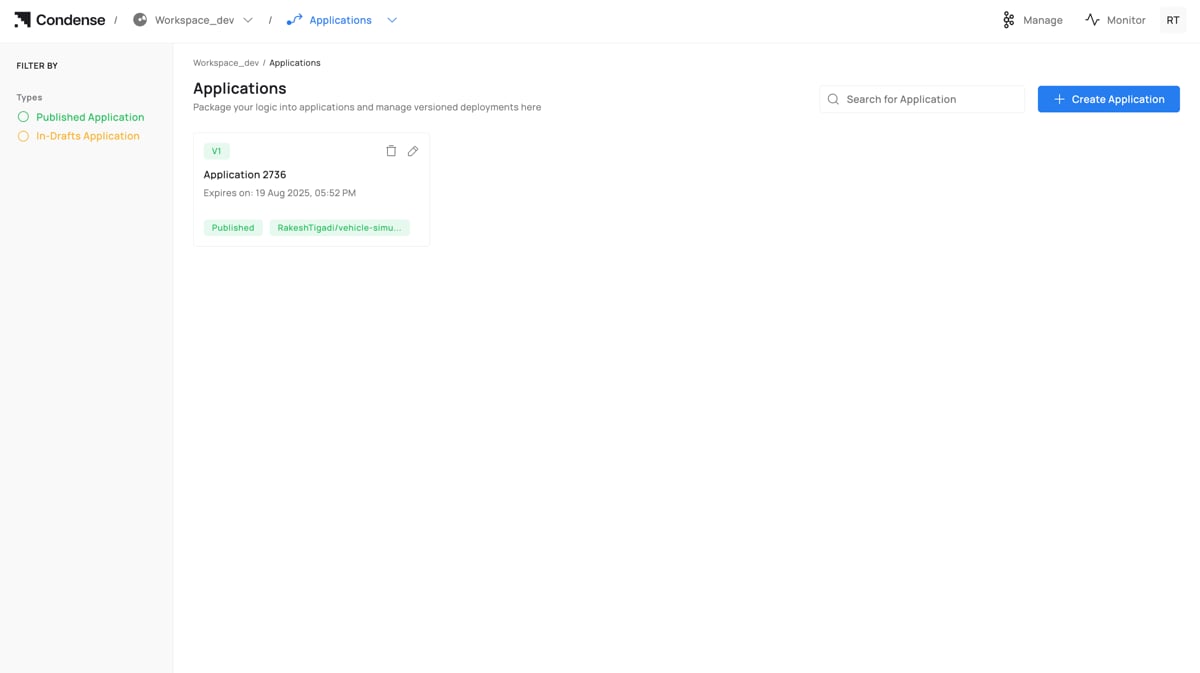 #### **Adding the new version**
 Starting the development of an application involves completing all required steps to build and publish it. After publication, the application appears in the **Transforms** or **Connectors** section, and when deploying a transform or connector in a pipeline, you will be prompted to select the desired version to deploy.
 ### **7) Deleting an Application**
Who can delete: Admins (and Maintainers if policy allows)
### **7) Deleting an Application**
Who can delete: Admins (and Maintainers if policy allows)
Warning: Deletion is irreversible. If a published Application is referenced by a transform/connector in a pipeline, update or remove that deployment first to avoid runtime errors.
### **Naming Rules**
* Allowed: only letters in lowercase
* Length: 3–63 characters.
* Must be unique within the workspace.
### **Editing an Application**
Who can edit: Admins, Maintainers, Developers
Editable (drafts):
* Source code in the IDE
* ENVs (environment variables)
* Expose HTTP(s)/TCP server toggles
* Description, icon, and version (for drafts)
* Repository/branch (until the first build against a commit)
Non‑editable:
* Application ID
* Creation timestamp
Note: After publishing, logic changes require a new version (edit → build → publish). Deployed components can switch versions without a rebuild.
## **IDE Structure**
* File Explorer (left): navigate and manage files
* Code Editor (center): code, linting, errors
* ENVs panel (side): runtime configuration, secrets masked
* Test Your Application: Publish and Subscribe testers
* Build Application: opens image name/tag dialogue
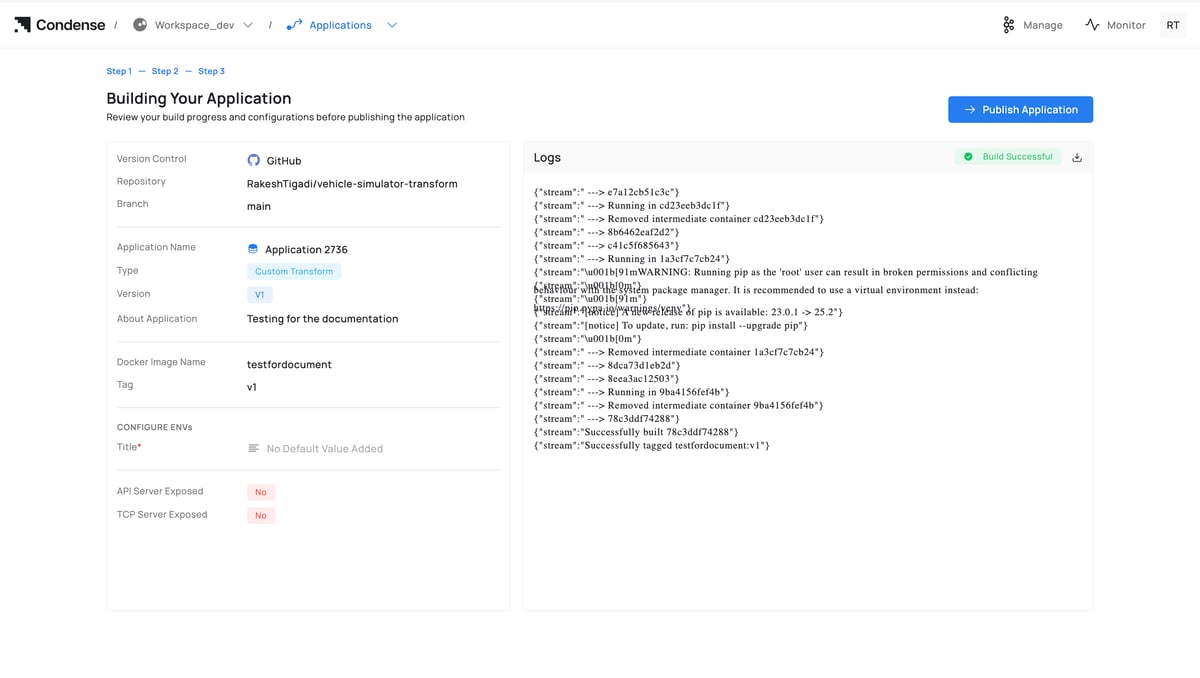
## **Building an Application**
Who can build: Admins, Maintainers, Developers
Steps to build an application:
1. Build Application → enter Docker Image Name and Tag.
2. Monitor Build Logs; on failure, review errors, fix code/ENVs/Dockerfile, and rebuild.
Notes
* Use a fully qualified image name for external registries.
* Some registries enforce lowercase tags; prefer lowercase alphanumerics, dots, and dashes.
* Pass secrets via ENVs; do not bake them into the image
 ## **Publishing an Application**
Who can publish: Admins, Maintainers
Publish Targets
* Custom Transform: listed under Transforms → Custom for pipeline use.
* Custom Connector (Input/Output): listed under Connectors → Custom according to your implementation.
Post‑publish
* Published versions are immutable.
* To change logic, edit → build → publish a new version.
* Deployed components can be switched to a new version from their configuration.
## **Publishing an Application**
Who can publish: Admins, Maintainers
Publish Targets
* Custom Transform: listed under Transforms → Custom for pipeline use.
* Custom Connector (Input/Output): listed under Connectors → Custom according to your implementation.
Post‑publish
* Published versions are immutable.
* To change logic, edit → build → publish a new version.
* Deployed components can be switched to a new version from their configuration. 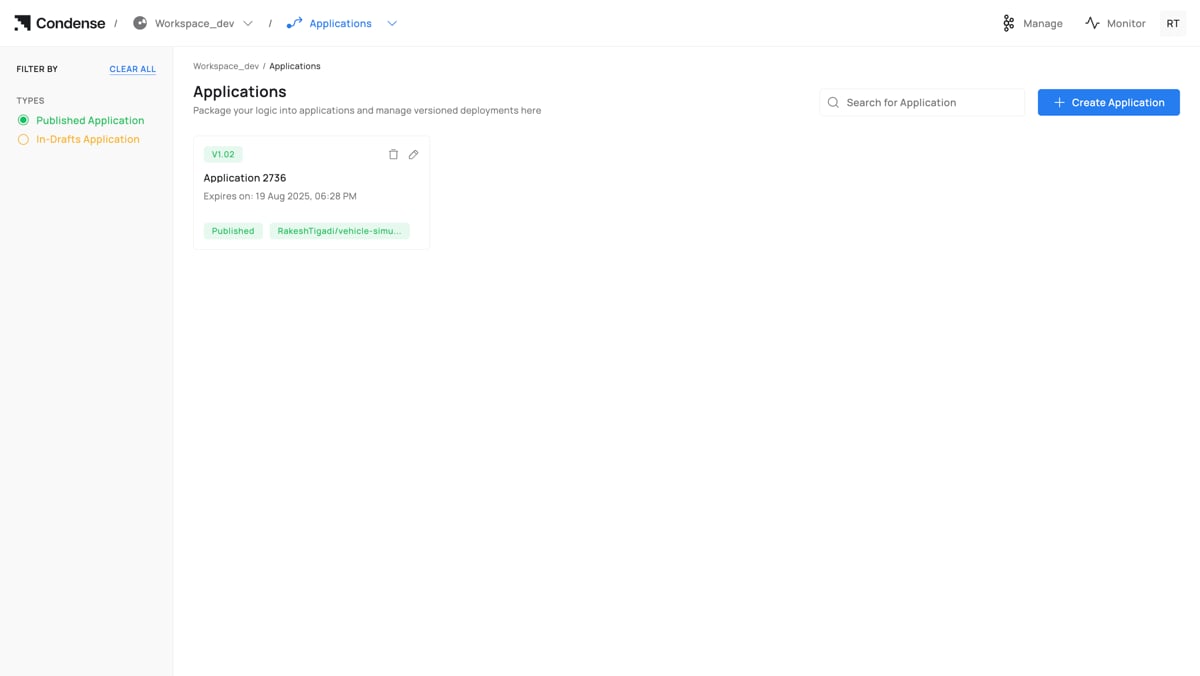 ## **Deleting an Application**
Who can delete: Admins (Maintainers if your policy allows)
Warning
* Irreversible in Condense.
* If referenced by any deployment, update/remove those deployments first.
## **Deleting an Application**
Who can delete: Admins (Maintainers if your policy allows)
Warning
* Irreversible in Condense.
* If referenced by any deployment, update/remove those deployments first. 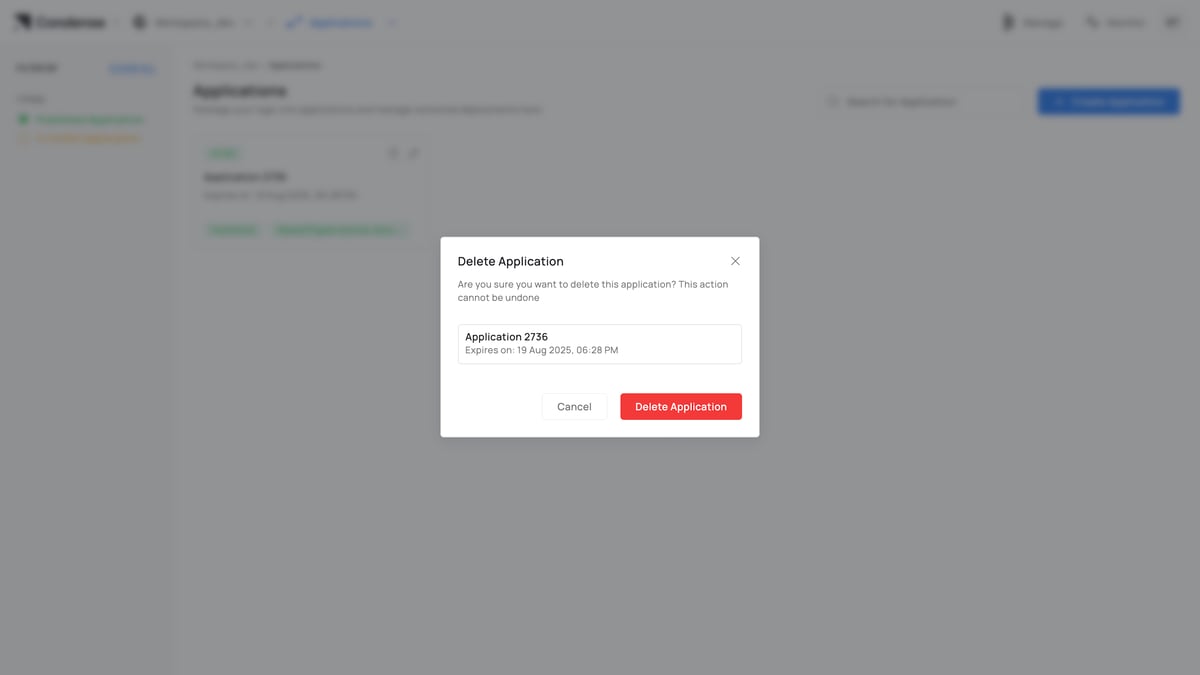 ## **Configuration Parameters**
A. Creation
| **Field** | **Description**
## **Configuration Parameters**
A. Creation
| **Field** | **Description**
| **Required** | **Notes**
|
| -------------------------- | ------------------------------------- | ------------ | ----------------------------------------------------- |
| Application Name
| Unique identifier in workspace
| Yes | 3–63 chars; letters, numbers, -, \_
|
| Publish as a custom
| Publish target at release
| Yes | Transform / Input Connector / Output Connector
|
| Version
| Human‑readable version label
| Yes | e.g., v1, v1.1.2
|
| Expiry
| Draft retention period
| Yes | Draft artifacts auto‑cleaned after expiry
|
| About
| Description for operators
| No | Shown in details and summaries
|
| Git Provider
| Authenticated provider
| Yes | GitHub / GitLab / Bitbucket
|
| Repository
| Repository path
| Yes | Selected from provider after auth
|
| Branch
| Source branch
| Yes | Changeable until first build
|
 ## **B. Development (Step 2: IDE)**
| **Element** | **Description** | **Notes** |
| -------------------- | ----------------------------- | ------------------------------------------- |
| File Explorer | Navigate/edit files | Supports multi‑file edits |
| Code Editor | Inline linting & errors
## **B. Development (Step 2: IDE)**
| **Element** | **Description** | **Notes** |
| -------------------- | ----------------------------- | ------------------------------------------- |
| File Explorer | Navigate/edit files | Supports multi‑file edits |
| Code Editor | Inline linting & errors
| Commit to Git with message
|
| ENVs
| Runtime configuration | Secrets supported; values masked |
| Expose HTTP(s)
| Enable HTTPS endpoint | App must bind to configured port |
| Expose TCP
| Enable TCP endpoint | For stream/socket prototyping |
| Publish | Send a test message
| Topic, key/value, format, partition |
| Subscribe | Fetch messages | Topic, partition, offset/size presets
|
| Build Application | Image name & tag
| Opens build modal |
 ## **C. Build (Step 3)**
| Field | Description | Required | Notes |
| --------------------- | ------------------------ | -------- | --------------------------------------------------- |
| **Docker Image Name** | Registry/repository path | Yes | Example: `registry/acme/vehicle-app` |
| **Tag** | Image tag | Yes | Align with the version (e.g., `v1.0.0`) |
| **Logs** | Build output stream | — | Downloadable; displays success/failure status pills |
Summary Pane (left): provider, repo, branch; detected language/runtime; app name/type (Transform/Connector); version; About; configured ENVs (masked); flags for exposed servers.
## **C. Build (Step 3)**
| Field | Description | Required | Notes |
| --------------------- | ------------------------ | -------- | --------------------------------------------------- |
| **Docker Image Name** | Registry/repository path | Yes | Example: `registry/acme/vehicle-app` |
| **Tag** | Image tag | Yes | Align with the version (e.g., `v1.0.0`) |
| **Logs** | Build output stream | — | Downloadable; displays success/failure status pills |
Summary Pane (left): provider, repo, branch; detected language/runtime; app name/type (Transform/Connector); version; About; configured ENVs (masked); flags for exposed servers.
 ## **D. Publish**
| Field | Description | Required | Notes |
| -------------- | -------------------------- | -------- | ------------------------------------ |
| **Publish as** | Transform / Connector type | Yes | Determines the catalog destination |
| **Version** | Release version | Yes | Immutable after publish |
| **Notes** | Release notes | No | Intended for operators and reviewers |
## **D. Publish**
| Field | Description | Required | Notes |
| -------------- | -------------------------- | -------- | ------------------------------------ |
| **Publish as** | Transform / Connector type | Yes | Determines the catalog destination |
| **Version** | Release version | Yes | Immutable after publish |
| **Notes** | Release notes | No | Intended for operators and reviewers |
 ## **Roles and Permissions (Applications)**
| Operation | Admin | Maintainer | Developer | Viewer |
| ---------------------------- | :---: | :--------: | :-------: | :----: |
| **Create application** | ✅ | ✅ | ✅ | ❌ |
| **Edit code / ENVs** | ✅ | ✅ | ✅ | ❌ |
| **Use Publish/Subscribe** | ✅ | ✅ | ✅ | ❌ |
| **Build application** | ✅ | ✅ | ✅ | ❌ |
| **Publish application** | ✅ | ✅ | ❌ | ❌ |
| **Delete application** | ✅ | ✅\* | ❌ | ❌ |
| **View applications list** | ✅ | ✅ | ✅ | ✅ |
| **View application details** | ✅ | ✅ | ✅ | ✅ |
\* Maintainer deletion depends on your organization’s policy.
### **Role descriptions**
* Admin: Full lifecycle control and governance.
* Maintainer: Operates lifecycle (develop/build/publish) but not workspace settings.
* Developer: Develops and builds; cannot publish or delete.
* Viewer: Read‑only.
## **Monitoring and Audit**
* Build Logs: full build output with success/failure indicators.
* Runtime Logs (when deployed): stdout/stderr available via Logger/observability stack.
* Version History: immutable publish records (version, author, timestamp).
* Activity Log: who created, edited, built, published, or deleted the Application.
## **Best Practices**
* Single responsibility: keep each Application focused for simpler testing and review.
* ENVs over hardcoding: configure ports, credentials, and endpoints via environment variables.
* Stable branches: map branches to stages (dev, staging, main).
* Tag discipline: align Version, image tag, and Git tag/commit for traceability.
* Test early: use Publish/Subscribe testers before builds to catch schema/mapping issues.
* Minimize image size: prefer slim base images for faster builds and deploys.
## **Common Pitfalls and How to Avoid Them**
* Published artefact not visible for deployment
## **Roles and Permissions (Applications)**
| Operation | Admin | Maintainer | Developer | Viewer |
| ---------------------------- | :---: | :--------: | :-------: | :----: |
| **Create application** | ✅ | ✅ | ✅ | ❌ |
| **Edit code / ENVs** | ✅ | ✅ | ✅ | ❌ |
| **Use Publish/Subscribe** | ✅ | ✅ | ✅ | ❌ |
| **Build application** | ✅ | ✅ | ✅ | ❌ |
| **Publish application** | ✅ | ✅ | ❌ | ❌ |
| **Delete application** | ✅ | ✅\* | ❌ | ❌ |
| **View applications list** | ✅ | ✅ | ✅ | ✅ |
| **View application details** | ✅ | ✅ | ✅ | ✅ |
\* Maintainer deletion depends on your organization’s policy.
### **Role descriptions**
* Admin: Full lifecycle control and governance.
* Maintainer: Operates lifecycle (develop/build/publish) but not workspace settings.
* Developer: Develops and builds; cannot publish or delete.
* Viewer: Read‑only.
## **Monitoring and Audit**
* Build Logs: full build output with success/failure indicators.
* Runtime Logs (when deployed): stdout/stderr available via Logger/observability stack.
* Version History: immutable publish records (version, author, timestamp).
* Activity Log: who created, edited, built, published, or deleted the Application.
## **Best Practices**
* Single responsibility: keep each Application focused for simpler testing and review.
* ENVs over hardcoding: configure ports, credentials, and endpoints via environment variables.
* Stable branches: map branches to stages (dev, staging, main).
* Tag discipline: align Version, image tag, and Git tag/commit for traceability.
* Test early: use Publish/Subscribe testers before builds to catch schema/mapping issues.
* Minimize image size: prefer slim base images for faster builds and deploys.
## **Common Pitfalls and How to Avoid Them**
* Published artefact not visible for deployment
**Cause**: Wrong publication as a custom choice.
**Avoidance**: Confirm the Transform vs Input/Output Connector before publishing.
* Unreachable HTTP/TCP during testing
**Cause**: Server not exposed or wrong port binding.
**Avoidance**: Enable the correct toggle and match the port ENV in code.
* “No messages yet” in Subscribe
**Cause**: Topic/partition/offset mismatch or too small a fetch window.
**Avoidance**: Use First/Last/Size presets and verify topic + partition.
* Build failures due to missing dependencies
**Cause**: Dependencies not in project config.
**Avoidance**: Add to dependency file (e.g., requirements.txt) and rebuild.
* Deleting an Application still referenced by deployments
**Cause**: Active transform/connector points to this Application.
**Avoidance**: Update or remove dependent deployments first.
## **Related Links**
* [Workspaces](https://zeliot.mintlify.site/condense/legacy/condense-app-getting-started/workspaces)
* [Transforms](https://docs.zeliot.in/condense/condense-app-getting-started/transforms)
* [Connectors](https://zeliot.mintlify.site/condense/legacy/condense-app-getting-started/connectors)
* [RBAC](https://docs.zeliot.in/condense/condense-app-getting-started/role-based-access-control-rbac)